documents and knowledge management

Text, tables and graphs in a single base.

What you upload stops being an opaque file: it becomes citable blocks, queryable rows or nodes with relationships. Here is the full path, from raw file to a deliverable you can defend.

#12
text

Text document

PDFs, scans, notes and pages land as an editable document split into blocks by section. Each block is embedded on its own, so the answer cites the exact paragraph — not “the file”.

  • Blocks cut at headings, not every 8,000 characters
  • Background OCR for images and scanned pages
  • Block-level citations: one click and you are at the source
SELECT … WHERE
table

Table and database document

Upload a table or connect a read-only SQL engine. The agent queries the rows, aggregates and compares — and the table is indexed as readable rows, not raw JSON, so semantic search finds it too.

  • PDF tables rebuilt from page geometry, never flattened to text
  • Read-only connections to SQL engines with TLS enforced
  • Five data-specific analysis lenses, over the real rows
graph

Graph document

When what matters is the relationship rather than the paragraph — who depends on whom, what causes what — the document is stored as nodes and edges. The agent queries by neighbourhood: it pulls the part of the graph it needs, not the whole thing.

  • Nodes and relationships with their properties, editable
  • Neighbourhood queries: only the relevant surroundings enter the context
  • Projected back to citable text, so the graph answers with a source too

All three types live in the same knowledge base, share its permissions and leave through the same endpoint. You never pick a format up front — you add the one you need when you need it.

the loop

Four moves: convert, cite, stack, deliver.

This is not a chat with a PDF attached. It is the whole loop — from the raw file nobody can search to the deliverable you can actually defend.

01convert

From raw file to blocks you can search.

Drop in a PDF, a scan or a table and Doctiling rebuilds it: page geometry so reading order survives, tables reassembled as tables, images pushed through OCR in the background, and cuts made at section boundaries — not every 8,000 characters. What comes out is an editable document, not an opaque attachment.

  • PDF tables rebuilt from geometry, not flattened into prose
  • Images and scans OCR'd on a durable queue — keep working while it runs
  • Blocks cut at headings, so one block is one idea
in practice

A firm loads a 60-page scanned contract their own search engine could not even open.

It comes out as a document with readable blocks and tables — and from that moment it is citable material.

02cite

The block is the unit of the answer.

Every block is embedded in 768 dimensions and indexed on its own. When you ask, the agent retrieves blocks — not whole documents — and answers with a citation to the exact one. If the answer is not in your sources, it says so.

  • Block-level citations: one click lands you on the source paragraph
  • Meaning-based search across the whole knowledge base
  • Multi-turn chat that keeps the document in focus
in practice

“Which contracts renew this quarter, and at what penalty?” — across forty agreements at once.

Back comes a table where every row links to the clause it came from: verifying takes a click, not an afternoon.

03stack

Twelve analysis lenses, stacked beside the document.

Mirror view splits the screen: your document on one side, the analyses on the other. Summary, entities, contradictions, comparison table, mind map, questions, critique — plus five lenses for database documents. Each one runs on the indexed content and stacks without erasing the last.

  • Twelve one-click lenses — no prompt writing
  • Analyze, synthesize and dialogue modes; fast, balanced or deep tier
  • Diagrams and mind maps rendered inside the document
in practice

A consultancy uploads three market reports and asks where they contradict each other before the client call.

The mirror shows every disagreement next to the clashing paragraphs — ready to take into the deck.
04deliver

The analysis becomes your document — or an endpoint.

Save any analysis as a variant: an editable document that keeps its trail back to the sources, ready to keep working on and to share with roles. Or expose the knowledge base as an MCP endpoint with a scoped, revocable token, so it answers from the tools your team already works in.

  • Editable variants with the trail to the source intact
  • Owner, admin, collaborator and reader roles — with per-user private analyses
  • Read-only MCP endpoint, scoped per token, revocable
in practice

A research group shares its literature base and queries it from their own MCP-compatible client.

One indexed corpus, many ways to work — and private analyses still belong to whoever made them.

what the agent returns

The agent does not just write: it draws what it found.

Answers render inside the document. Charts, diagrams, mind maps and comparison tables come out of the indexed content — with the trail back to the source intact — and save as an editable variant of your own.

Charts from your data

Bars, lines and distributions computed over the real rows of your table documents, not over an invented summary.

Flow and architecture diagrams

The agent writes the diagram and it renders in the block: processes, architectures, sequences. Editable afterwards, like any other block.

Mind maps

A long document's structure unfolded as a navigable map, so you can see what it covers before reading all of it.

Comparison tables

Several documents set against each other row by row, each cell linked to the block it came from: verifying takes one click.

Plus summary, entities, contradictions, questions, critique and study cards — twelve one-click lenses, no prompt writing.

the studio, live

This is what working with your documents looks like.

Real captures of the studio — no filler mockups.

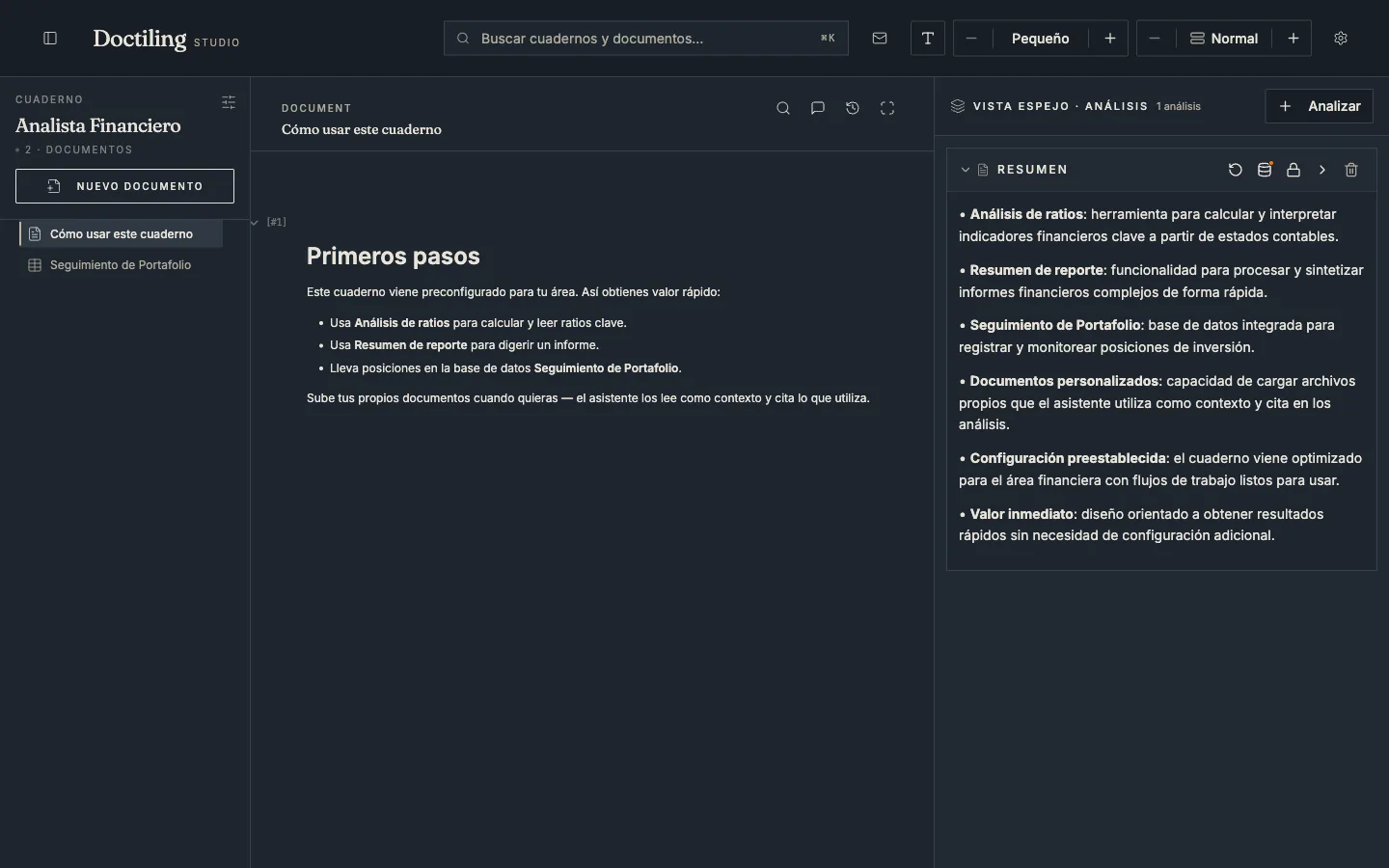
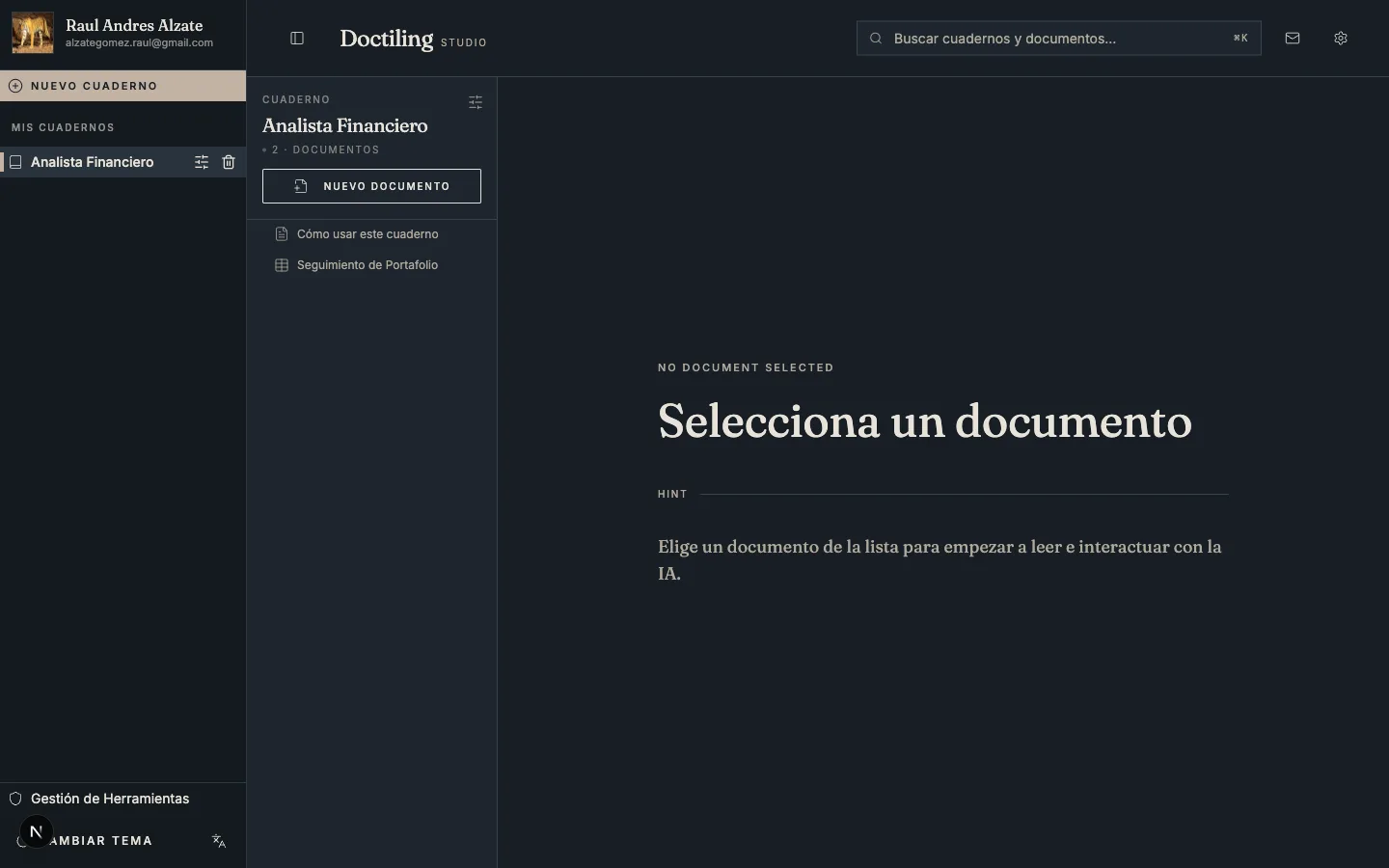
Doctiling studio: the Analista Financiero knowledge base with its indexed documents in the sidebar.

The studio: your knowledge bases and documents in one place, indexed and ready.

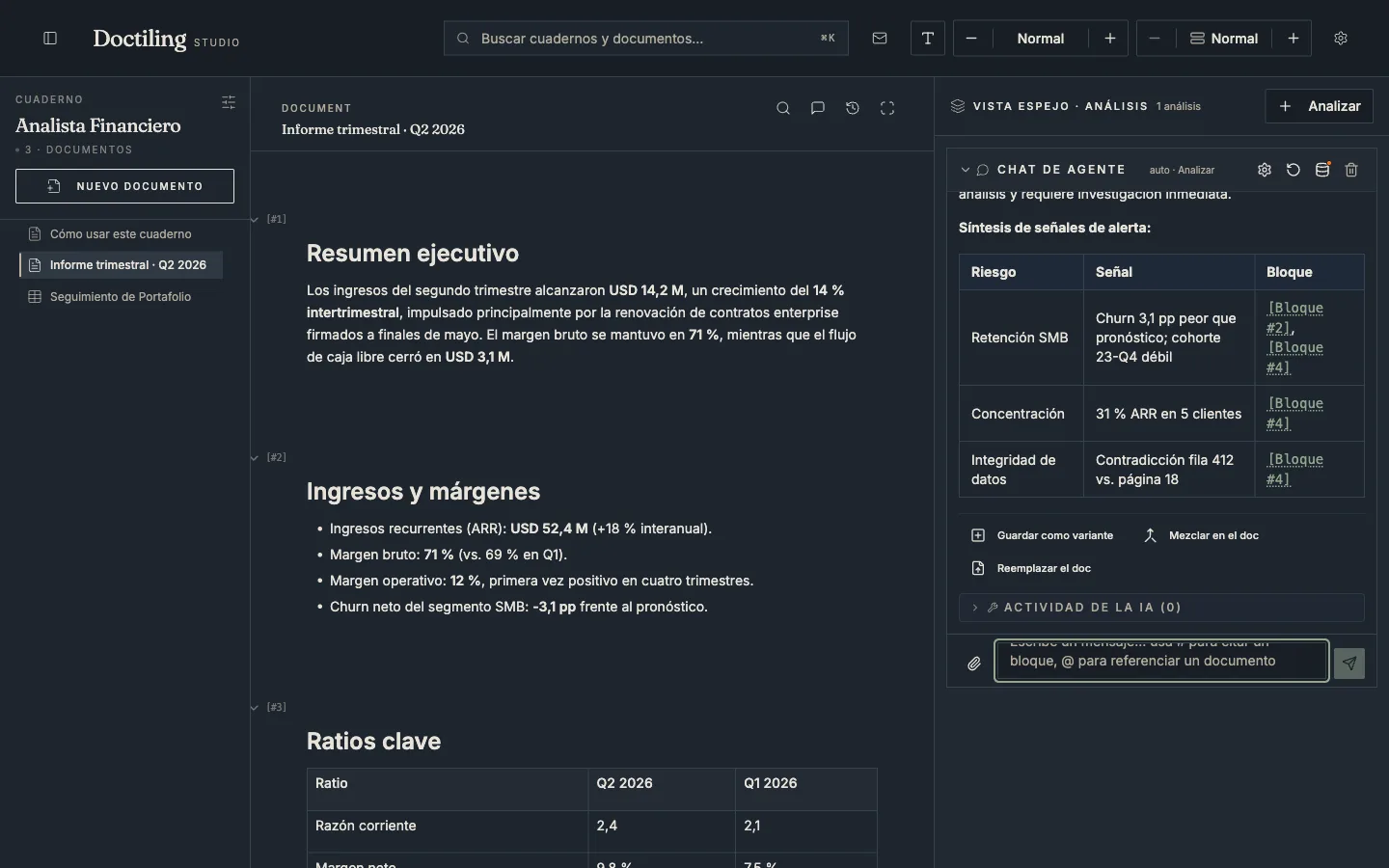
Agent chat in Doctiling: a risk table where each row links to the exact document block.

Ask, and every answer cites the exact block of your document — click the citation to jump to the source.

Doctiling mirror view: the document on the left and the agent's summary on the right.

Mirror view: the document on one side, the agent's analysis — grounded in its content — on the other.

And there's more in the studio.

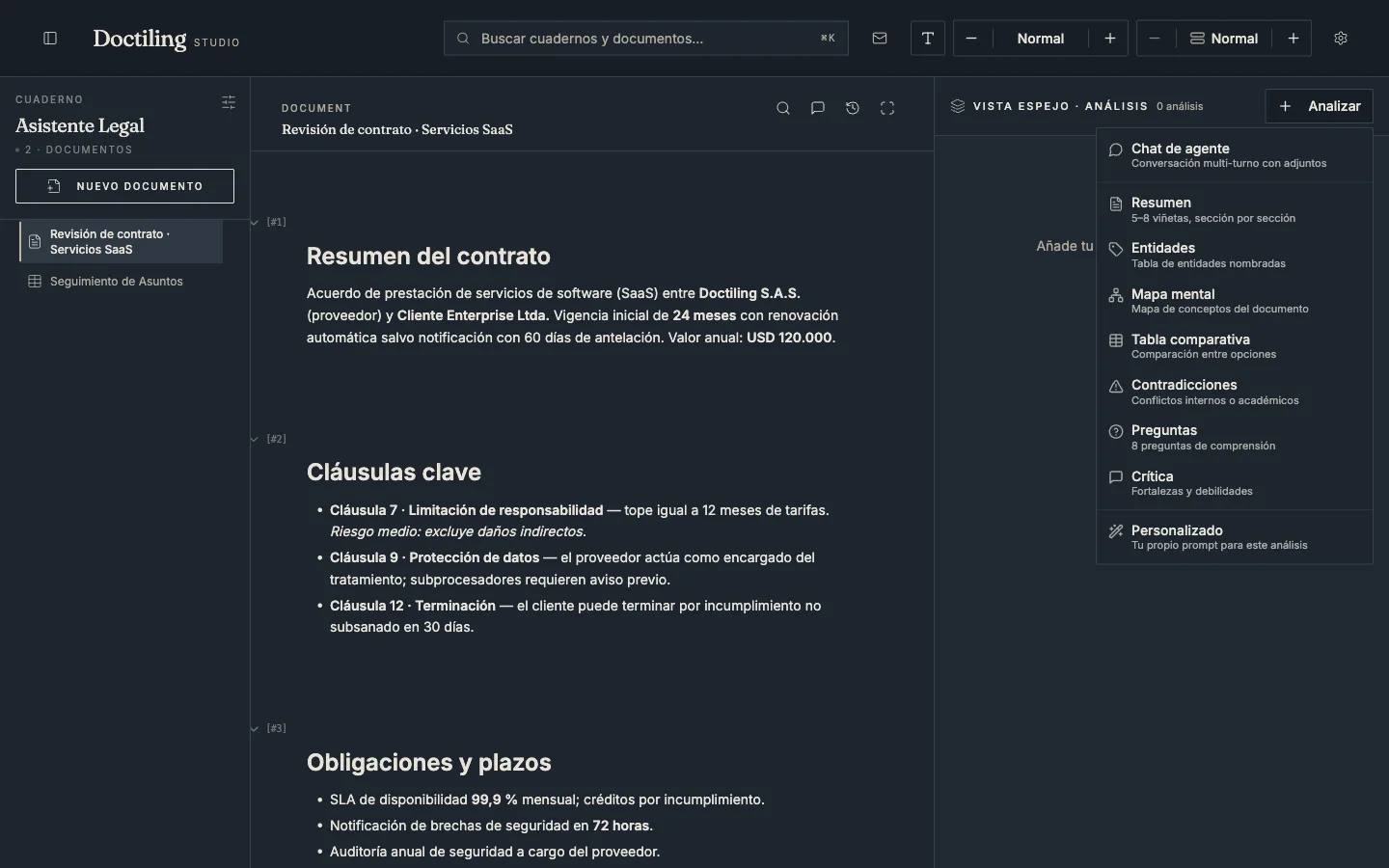
Doctiling analysis menu: Summary, Entities, Mind map, Comparison table, Contradictions, Questions and Critique.

Ready-made analysis lenses: summary, entities, mind map, contradictions, questions and more — one click.

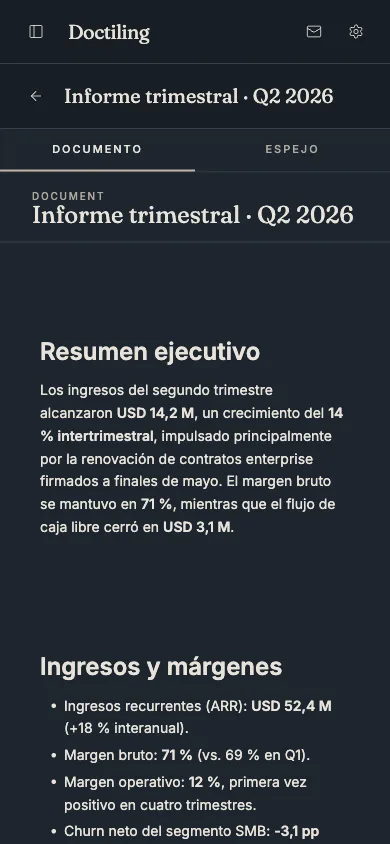
Doctiling on mobile: a quarterly report with Document and Mirror tabs.

The same studio in your pocket — install it as an app and query your documents anywhere.

Stop planning your RAG. Start operating your knowledge bases.

Request your free access with your email — we review it and send the invitation shortly. No credit card. Already invited? Sign in and your first knowledge base is one click away.

    Document types in Doctiling — text, tables and graphs